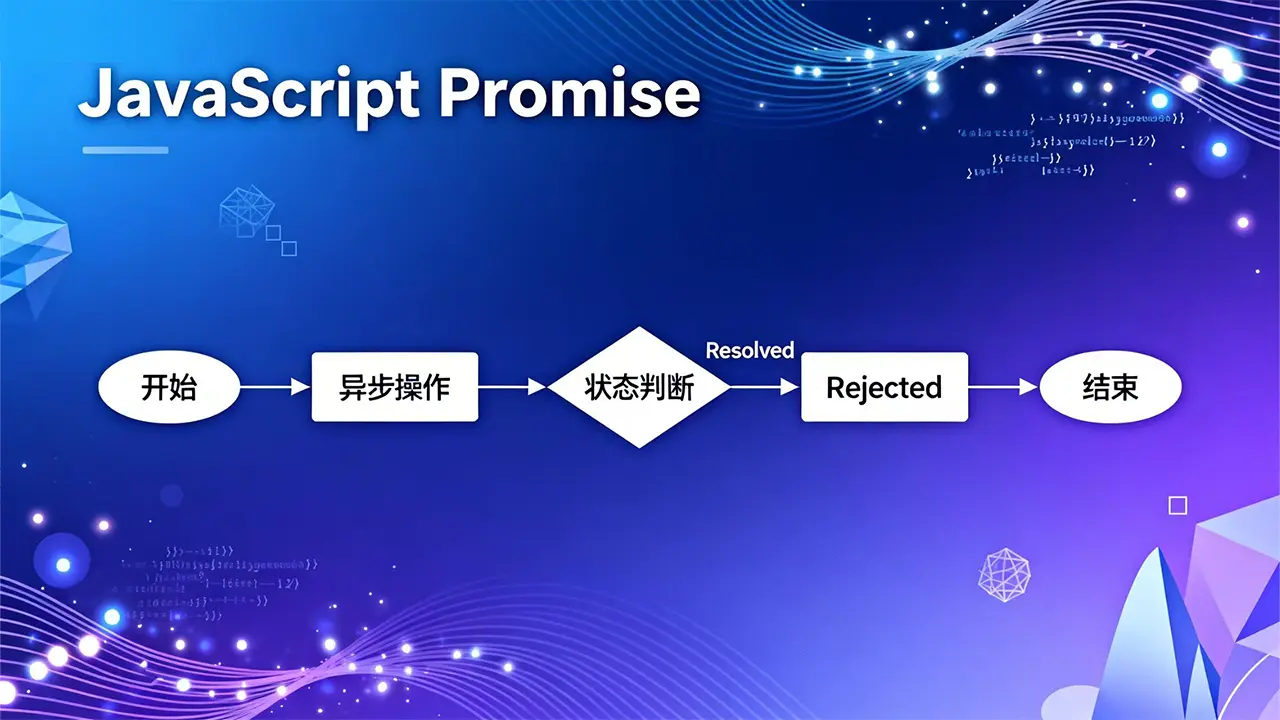
fetch 是现代浏览器提供的一个强大的网络请求 API,用于发起 HTTP 请求并处理响应。它基于 Promise,提供了比传统的 XMLHttpRequest 更简洁、更灵活的接口。
1. fetch 的基本语法
fetch(resource, options)
  .then(response => {
    // 处理响应
  })
  .catch(error => {
    // 处理错误
  });
其中:
resource:可以是 URL 字符串或 Request 对象。
options:可选的配置对象,包含请求方法、头信息、请求体等。
2. fetch 的核心特性
2.1 返回 Promise 对象
fetch 方法返回一个 Promise,这使得我们可以使用 .then() 和 .catch() 链式调用,或结合 async/await 来处理异步请求。
// 基本使用示例
fetch('https://api.example.com/data')
  .then(response => {
    if (!response.ok) {
      throw new Error('Network response was not ok');
    }
    return response.json(); // 解析 JSON 数据
  })
  .then(data => {
    console.log(data); // 使用解析后的数据
  })
  .catch(error => {
    console.error('There was a problem with the fetch operation:', error);
  });
2.2 状态处理特点
重要特性:fetch 的 Promise 不会因为 HTTP 错误状态码(如 404、500)而被拒绝,只有当网络请求本身失败时才会拒绝 (如断网、跨域问题等)。因此,必须手动检查 response.ok 属性。
response.ok 是一个布尔值,当响应状态码在 200-299 范围内时为 true。
3. fetch 的请求配置
fetch 支持多种配置选项,通过第二个参数传入:
fetch('https://api.example.com/data', {
  method: 'POST', // GET, POST, PUT, DELETE, PATCH 等
  headers: {
    'Content-Type': 'application/json',
    'Authorization': 'Bearer token123'
  },
  body: JSON.stringify({ name: 'John', age: 30 }), // 请求体,仅用于 POST, PUT 等
  credentials: 'include', // 包含 cookies,处理跨域认证
  cache: 'no-cache', // 缓存策略
  redirect: 'follow', // 重定向处理
  referrerPolicy: 'no-referrer', // 引用策略
  mode: 'cors', // 模式:cors, no-cors, same-origin
  signal: abortController.signal // 用于中止请求
})
.then(response => response.json())
.then(data => console.log(data))
.catch(error => console.error('Error:', error));
4. 响应对象的处理方法
fetch 返回的响应对象提供了多种方法来解析不同类型的响应数据:
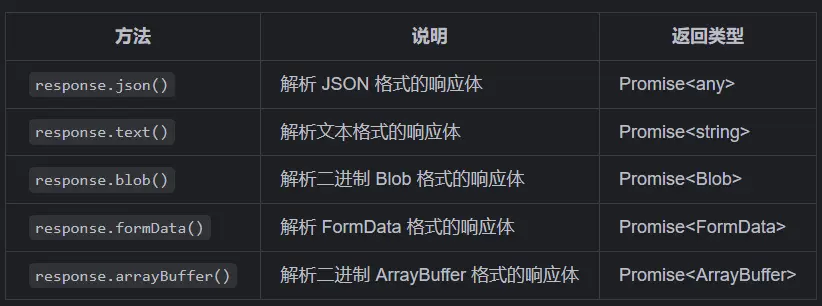
这些方法都是异步的,返回 Promise,需要再次使用 .then() 或 await 来获取解析后的数据。
5. fetch 的错误处理
由于 fetch 只会在网络错误时才会 reject Promise,因此需要手动处理 HTTP 错误状态码:
fetch('https://api.example.com/data')
  .then(response => {
    // 检查响应状态
    if (!response.ok) {
      throw new Error(`HTTP error! Status: ${response.status}`);
    }
    return response.json();
  })
  .then(data => console.log(data))
  .catch(error => {
    // 这里会捕获网络错误和手动抛出的 HTTP 错误
    console.error('Fetch error:', error);
  });
6. 高级用法
6.1 使用 async/await 简化代码
async function fetchData() {
  try {
    const response = await fetch('https://api.example.com/data');
    if (!response.ok) {
      throw new Error(`HTTP error! Status: ${response.status}`);
    }
    const data = await response.json();
    console.log(data);
    return data;
  } catch (error) {
    console.error('Fetch error:', error);
    throw error;
  }
}

// 调用函数
fetchData();
6.2 中止正在进行的请求
使用 AbortController 可以中止正在进行的 fetch 请求:
// 创建中止控制器
const controller = new AbortController();
const signal = controller.signal;

// 5 秒后中止请求
// 执行setTimeoout后不会形成阻塞,后面的fetch函数会立即执行。
// 这是由JavaScript的异步非阻塞特性决定的。
// 当定时器触发时,会调用AbortController实例的abort()方法
// 这会触发与该控制器关联的signal对象发出中止信号
// fetch请求监听到这个信号后,会立即终止正在进行的网络请求
setTimeout(() => controller.abort(), 5000);

fetch('https://api.example.com/large-data', {
  signal // 传入信号
})
.then(response => response.json())
.then(data => console.log(data))
.catch(error => {
  if (error.name === 'AbortError') {
    console.log('Fetch aborted');
  } else {
    console.error('Fetch error:', error);
  }
});
// 作用意义
// 1. 防止网络请求因服务器响应缓慢而无限期等待。
// 2. 避免长时间占用浏览器资源。
// 3. 提高用户体验,及时处理超时情况。
// 4. 在代码中通过catch捕获AbortError来区分是请求中止还是其他错误。
6.3 自定义请求对象
可以使用 Request 构造函数创建请求对象,实现更复杂的请求配置:
const request = new Request('https://api.example.com/data', {
  method: 'POST',
  headers: new Headers({
    'Content-Type': 'application/json'
  }),
  body: JSON.stringify({ key: 'value' })
});

fetch(request)
  .then(response => response.json())
  .then(data => console.log(data));
6.4 使用 Headers 处理请求头
const headers = new Headers();
headers.append('Content-Type', 'application/json');
headers.append('Authorization', 'Bearer token123');

fetch('https://api.example.com/data', {
  method: 'GET',
  headers: headers
})
.then(response => response.json())
.then(data => console.log(data));
7. fetch 与其他请求方式的比较
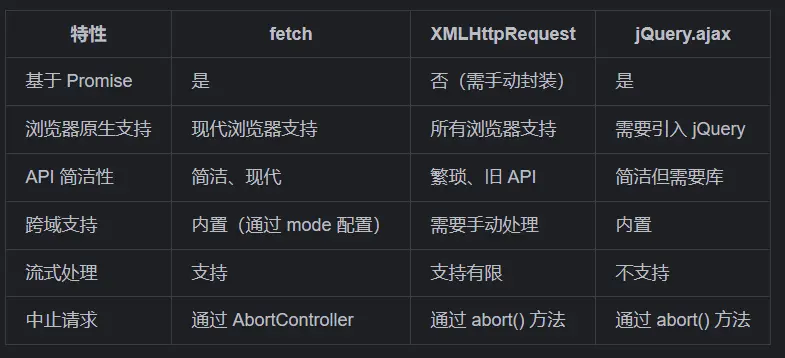
8. 浏览器兼容性
fetch 在所有现代浏览器中都有很好的支持,但在 IE 中不支持。如果需要兼容 IE,可以使用 fetch polyfill,如 whatwg-fetch。
9. 实际应用示例
9.1 获取用户数据
async function getUserData(userId) {
  try {
    const response = await fetch(`https://api.example.com/users/${userId}`);
    if (!response.ok) {
      throw new Error(`Failed to fetch user: ${response.status}`);
    }
    return await response.json();
  } catch (error) {
    console.error('Error fetching user data:', error);
    return null;
  }
}

// 使用
const user = await getUserData(123);
if (user) {
  console.log('User name:', user.name);
}
9.2 提交表单数据
async function submitForm(formData) {
  try {
    const response = await fetch('https://api.example.com/submit', {
      method: 'POST',
      headers: {
        'Content-Type': 'application/json'
      },
      body: JSON.stringify(formData)
    });

    if (!response.ok) {
      throw new Error(`Form submission failed: ${response.status}`);
    }

    return await response.json();
  } catch (error) {
    console.error('Error submitting form:', error);
    throw error;
  }
}

// 使用
const result = await submitForm({
  name: 'Alice',
  email: 'alice@example.com'
});
console.log('Submission result:', result);
10. 注意事项
1. 默认不发送 Cookie:需要设置 credentials: 'include' 才会在请求中包含 Cookie。
2. 需要手动处理 HTTP 错误状态码:即使返回 404、500 等错误,fetch 也会 resolve Promise。
3. 跨域请求限制:受浏览器同源策略限制,需要服务器设置正确的 CORS 头。
4. 不支持 progress 事件:如果需要上传进度,可能需要使用 XMLHttpRequest 或新的 Streams API。
5. 请求超时处理:fetch 没有内置的超时设置,需要使用 AbortController 手动实现。
通过掌握 fetch API,你可以在 JavaScript 中更加高效地处理网络请求,编写更加现代、简洁的异步代码。